Wednesday, November 17, 2010

City of PPC never sleeps

What can we expect to happen with the quantity and quality of PPC traffic in the not-so-distant future? Has the genesis of the machinery that creates, controls, and disperses traffic reached its plateau, and everything that can be invented has already been invented? It may appear so on the surface.

Consider Overture. The company currently has the widest reach, extending to 80 percent of Internet users, 67,000 active advertisers, and last quarter revenues of $152M. "Key factors that will ensure our continuing leadership position are our long-term contracts with distribution partners, state-of-the art proprietary technology that allows us to operate the business on this scale, and having a very strong international element," said Overture's Wax.

Have the industry leaders become complacent? Make no mistake. "We not only believe that someone smaller than us, or someone currently not in our space, can come up with a great idea that could change our industry and FindWhat.com's standing within the industry," said Thune. "We assume it will happen. And it has recently, with Google's entrance into pay-per-click paid listings."

Currently, the large and small PPC players alike rely on anecdotal evidence of their traffic effectiveness, as provided from time to time by cooperating advertisers - though many advertisers themselves rely on quite unscientific traffic-to-sales conversion information.

To address these issues, 7Search has recently introduced a feature that in the long run can produce a huge impact on the whole traffic industry. The company created an "ROI feedback tool" that sends information on advertisers' sales back to the search engine, where it is used to gauge the quality of affiliate traffic.

It is hard to overestimate the importance of 7Search's approach. Just think, for example, what it can do to the Google's Ad Words program relevancy and rankings algorithms?

"There's targeted traffic, and there's more targeted traffic," said Prestipino. 7Search is also implementing a patent-pending technology dubbed "predictive search" to increase relevancy of advertisers listings appearing as a result of the search.

Search123 works along similar lines, integrating the technology that will assist in matching keyword-based search queries and phrases with users' intentions. "Understanding the dynamics between the buyer and the seller", explains Beriker, "is what it will take to be the leader in this industry."

Search123's website sums it up best: "We're obsessed with traffic quality."

And so are all of us in the business of buying and selling, measuring and analyzing, loving and hating, going broke and making a killing on Internet traffic.

Tuesday, November 16, 2010

Common PPC Mistakes

As I manage quite a few PPC campaigns I always notice the silly and sometimes not so silly mistakes that advertisers make with their PPC programs.

Mistakes when creating PPC ads, click fraud detection, and lack of testing are just a few of them. Fixing each of these mistakes could mean an extra 70% of revenue or a savings of thousands of dollars every month.

Below is a list (we all love those lists don't we?) of the most common mistakes marketers make with their paid search (PPC) advertising campaigns.

1. Bidding Broad - It's important to not be lazy when setting up that campaign of yours. Every industry has their giant keywords that bring the most traffic but there are many more variation of keywords that are being searched. The more you focus on the "long tail keywords", the less you're going to pay per click. Furthermore, your ads will be ranked higher if the keyword is closer matched. Take your 100 keywords and make them into 200 by just looking at your own web statistics for exact keyword variations people use to search for your product.

2. Fighting for #1 Spot - Most of the time (from my experience), being #1 ad in paid search results is not the brightest strategy, especially if you're paying a lot per click and the keyword is broad. I found that one of THE best ranks in paid search is being #3 (top left side for Google). Look, most people do research before they buy online. Being #1 could mean that you'll attract visitors who might have not used the right keyword for their search or ones that are just starting their research and thus you'll be remembered last when they are ready to buy.

3. Avoiding Geo-targeting - Even if what you sell works all over US or world, people are still more keen on using a local provider or at least a company that recognizes "their state". It's just a psychological thing. Google and other search engines allow you to geo-target your PPC ads by state. Create 50 ads and drop in the state name inside the ad. You will surely get a higher click through rate (CTR) and thus a lower CPC. Furthermore right from the start, your visitor will know that you "recognize" their location.

4. Losing Relevance on Landing Page - Whatever you say in your ad repeat it on the landing page where you're taking the visitor! If you are advertising an 80% sale in your ad, you can be sure that people are looking for it when they land on your landing page. If they don't see it they leave. It's kind of like a scent they pick up on when they read your PPC ad and look for when they land on a page you take them to.

5. Getting Rid of Fraud Networks - Every paid search engine, be it Google, Yahoo, MSN, etc, has a network to which they distribute your ads. Unfortunately, many of these networks are fraudulent and do not refer quality traffic. Look into your web statistics and find domain names that bring you traffic with a high bounce rate. Usually it will be around 90%. Google allows you to drop these domains into a "negative excluded sites" folder while Yahoo and others make you call them to address the problem. Doing this will prevent you from paying for garbage traffic.

6. Being Boring - I still see marketers go online, search for a keyword, look at the advertisers (competition) and create ads to fit in with the "community". Silly right? Unfortunately, very true. Anytime you create a paid ad you MUST look at what is already being said by the advertisers and come up with something unique and yet relevant. It's a tough one but you have to identify what is unique about you and why people should buy from you. Just make sure that it's what your target market wants and cares about.

7. Using Telephone Numbers - Using a telephone number within your PPC ad is an eye catcher that's all. Not many people will pick up their phone and dial your number if they see your ad. So what you're doing is just wasting space that can be used for a good message. Tests have been done and this was proven quite a few times get rid of that phone number in the ad.

8. Not Bidding for Your Name - If your competition is targeting your company name as a keyword I'd suggest taking legal actions (if applicable). In our company we send out those legal letters at least every other month to a competitor. If you're in a different situation bidding for your keywords will mean more traffic and another real estate space devoted to you on that search results page. I'd even bid for the company name if there were no competitors at all. You will pay around 0.05 to 0.10 cents per click and see the amount of searches (impressions) that are done for your brand name. A little of extra statistics that shows you the possible growth of your company.

9. Lack of Affiliate Control - The company name is usually the highest converting keyword. Your affiliates know this and advertise under your company's name in paid search. What happens is that not only do you now have to pay your affiliate for the sale "they" brought in, but you've already paid your due with your own advertising methods for that customer to know your name before the search. Be sure to prevent your affiliates advertising in paid search for your company's name. All they are doing there is collecting the cash from your own advertising.

10. Not Separating Content Match from Search Results - This is a mistake 101. Yes it takes time, but any campaign should separate their regular search advertising from content match. This will allow you to get better reporting, set different cost per click, different budget and overall have a cleaner look at both of these campaigns. Just separate into 2 campaigns. Both will have same keywords but one campaign will be created only for "search" and the other one for "content match".

11. Ignoring the Seasonal Copy - It works. Including a seasonal discount or a "holiday special" in your ad copy is a great way to increase your CTR and get more sales. Furthermore, your ad will clearly stand out from the rest. Make it a Christmas special, Spring special, Summer blow out, etc. Make it relevant to "today".

12. Lack of "Exact Tracking" - You must be able to track every visit to your site from PPC advertising by the exact keyword, campaign and ad group used. To do so you can set variables (yourcompany.com/?keyword) or integrate your PPC campaigns with your website analytics software. This is the only way you can really calculate the effectiveness of every keyword you use to get traffic.

13. Paying for Negative Keywords - Google and other search engines allow you to report keywords for which your ads should not be shown. If you're paying for "broad match" keywords, you'll see a lot of visits from people who've typed your keyword with a word "free" or "stock" or "jobs". Do you want to pay money for visitors who're looking to pay $0 for what you sell? Do you want to pay money for visitors who are researching stock info on what you sell? Be sure to use that "negative keyword folder" to get rid of these worthless clicks.

14. Mistaking CTR with conversion rate when testing ads - We love to test and that's great, but what should marketers look for when choosing which ads to keep and which to delete? Looking only at the CTR (click through rate) is a false indication of a better performing ad. If you add a word "FREE" to your ad, you'll see a jump in your CTR but what good will it do?

15. Not Using Keywords in Ad Copy - This is a simple one. Put keywords into your ad copy for which you are serving the ad. Not only will your ad be more relevant but the keywords in it are going to be bold.

16. Not Calling Google - Ok, I am not a fan of being a "rat" or telling on someone, but my friend when it comes to business and playing fair, you have every right to raise a flag when you see a competitor engaging in bad techniques. You'll notice some of your competitors creating multiple accounts and having 2 ads simultaneously on the Google PPC results page. Google has a policy against this. Call Google and let them know if your competitor is doing anything that's against the rules of the search engine. You'll be amazed how quickly they take care of the problem.

17. Avoiding Brand Name Keywords - It is unfortunate, but many companies do not take advantage of their competitors. How do you do this? Bid on their brand / company name. Think about it anyone searching for your competitor could easily be your customer instead. Why not have your ad show up under that keywords? What if they are still shopping around? What if they are searching for your competitor's name because they saw their TV or radio ad. Bottom line is, bid on your competitor's brand names. Most of the time the ROI on those keywords is excellent. If you get a "legal letter" from the competitors and it holds water, I'd suggest comply with it.

Thursday, November 11, 2010

Submit a Podcast

List of sites that accept podcast submissions.

Podcasting Station - submit podcasts to the podcasting directory
Podcast Alley - submit podcast title, website, xml feed, and description.
Podcast Bunker- recommend a podcast, only high quality podcasts will be added.
Podcast411- add a podcast
AllPodcasts - index a podcast (an RSS 2.0 feed with an audio enclosure), enter the URL for the RSS feed into the field below and click "Index".
RSS Network - submit to podcast category
Podcast Pickle - submit to podcast category
Plazoo - submit to podcasts or vlogs
Singing Fish - submit music/video directory
Digital Podcasts - add podcasts to the digital podcast directory
PodFeed - podcast submission
Podcast Charts - chart podcasts (requires membership)
iPassages - Christian podcast submissions
PodBlaze - small podcast directory
GetAPodcast - post podcasts and rss feeds
Syndic8 Podcast - post podcasts and rss feeds
Podcast Shuffle - post podcasts
idiotvox - submit a podcast feed
Pod Lounge - The Pod Lounge relies on user submissions to help build the database and we appreciate any additions you can provide
iTunes - submit your iTune podcasts
Amigo Fish - submit a feed/podcast
Every Podcast - submit podcasts
Fluctu8 - submit podcasts
Get a Podcast - submit podcasts
HardPodCafe - submit podcasts
Podcast Pup - submit podcasts
Religious Podcasts - submit religious podcasts (only accept religious casts)
Educational Podcasts - submit educational podcasts
Feedshark - automate submissions to 10 podcast sites
Pluggd - podcast submissions
Canadian Podcasts - submit podcasts
GODcasts1000 - submit Christian podcasts
Realty Feeds - submit real estate podcasts or feeds
Podcast Directory - submit all podcasts (fee for submissions)
Medical Feeds - submit medical podcasts
Sports Podcasts - submit medical podcasts
PodcastLikeThat - add podcast feeds
Sports Podcasts - Submit sports related RSS feeds and podcasts.
Political Podcasts - Submit political feeds and podcasts.
Government Podcasts - Submit podcasts and feeds ONLY from government agencies. Feeds from both Local and federal governments are accepted.
iBiz Radio - Submit podcasts (only submit business podcasts)
Podcast Blaster - Submit podcasts
Educational Podcasts - Submit educational podcasts and feeds.
Blubrry Podcasts - login to submit podcasts.
Podcast Like That - submit podcasts.
Mirpod - submit podcasts.
Women in Podcasting - submit podcasts.
FOREIGN LANGUAGE PODCASTS
01Podcasts - submit French language podcasts
ElPodio - submit spanish language podcasts
Lusocast - submit portuguese language podcasts
VIDEOCASTS
Videocasting Station - submit videocasts and vodcasts
Podcast Salad - submit video podcasts
Search for Video - submit video podcasts
meFeedia - add a videoblog or podcast feed
GoTube - submit audio or video
Atom - upload video
Break - upload videos
ClickCaster - upload videos
Clipmoon - upload video content
ClipShack - upload video content
DailyMotion - upload video content
SevenLoad - upload video content
Flurl - upload video content
Crackle - upload video content
Meta Cafe - upload videos
MotionBox - upload video contents
Butterscotch - upload video contents

Wednesday, November 10, 2010

There are many ways that you can really hurt your search rankings in today’s search space and it is important that if you are planning on doing anything online you consult with a professional especially if you base your livelihood on your organic rankings.

Website Overhaul
If you are doing a large sweeping website overhaul and you are planning on changing everything including URL structures and content you will see a dip in rankings. The proper way to change URL structures is by implementing a 301 redirect on the old webpages you are converting. This is common as websites do often times change technology platforms. Removing all old content can also pose a problem. Rather than changing content completely try just updating the old content so it is not such a drastic change in the eyes of the search engines.

Black Hat SEO
Black hat results might look appealing from the quick rankings you could receive but remember those rankings will not last long and if Google pings you as a black hat spammer you could find yourself with a search penalty so large you have to start an entirely new website. Imagine how fun that would be? Don’t fall into this trap because you will regret it when you lose all your rankings.

Duplicate Content
Duplicate content is a huge no-no and if the search engines catch up to you and find you have any on your website you could find yourself with a penalty. Always write unique content across your website in order to stay away from any potential problems.

Not Enough Marketing (Link Building)
The bottom line is that simply optimizing your website in many niches and categories is not going to be enough to acquire those search rankings you are looking for. You have to proactively link build your website and your internal web pages in order to achieve those desired rankings.

Try reading through all the helpful google webmaster guidelines online on how to stay within range of the search engine firing squads so you don’t find yourself on the losing end of the search results, or page 193.

Monday, November 8, 2010

If you already have a mobile site, it’s important to understand the nuances involved in managing SEO for your mobile presence. If you do not have a mobile site and are starting the process of developing your mobile strategy, this webinar will share insights and potential hurdles you’ll want to avoid when optimizing your mobile presence for search engines.

Siteworx SEO Practice Manager Gregg Wyland will address:

-How search engines differentiate mobile searches from Web searches
-You’ll learn how to direct Google to use your actual mobile site as the default location for those searching from a mobile device
-Key differences in how users approach mobile search
Most mobile users will search based on location (where I am) and a need to find a person, place or thing
-Mobile SEO best practices
We’ll identify steps to ensure your mobile URLs are viewable on a mobile device
-The advantages of supporting location-based search results
Tools to review your mobile SEO performance
Registration is free and our 30-minute format maximizes your return on time invested (ROTI).

To learn more, visit http://www.siteworx.com/Company/Thought-Leadership/Webinars/Managing-Search-for-Your-Mobile-Presence. For regular updates, subscribe to Siteworx news (http://www.siteworx.com/e-news) and follow @Siteworx on http://www.Twitter.com/siteworx.
Search Engine Optimization (SEO) is so often kicked around and many times misunderstood. Business people and marketers actively using the web as a source for promoting their products know of it, but not all are sure how to “optimize” their site. Now I’m no SEO guru, but I’ve had a bit of experience working with SEO programs and have attended a few conferences on the topic, including the recent show in San Francisco which I found invaluable. The common question is, “How the hell do I get my site to rank high on Google?” Ranking high on Google means having your site appear on the first page when a user on the net types a keyword relative to your business. This is referred to as a “natural” search, as oppose to a “paid” search where you pay Google for your text ad to appear each time your choosen keyword is typed in. A recent study that I blogged about found that natural searches were just as effective in generating lead traffic as paid searches. To me, this further underlines the importance of adopting SEO practices.

Amongst all the different strategies I’ve heard, some so convoluted I wouldn’t know how to repeat, one thing holds true… CONTENT IS KING. The more relevant and useful your site content is to users searching on your keywords, the more traffic you will generate to your site. And the more traffic you generate, the more popular your content can become (measured by users linking to your site and bookmarking it), the higher your ranking on Google. This is a simple way of viewing SEO, but there are some things you can begin doing to optimize your site. Here are a few:

1. Include White Papers and Tips Related to Your Area of Expertise -Users interested in your products and services want to know how to use them to better their business, so give it to them. Your site should include white papers, tips, articles, and any other written material that users would find useful. The more useful the content, the more often they will come back for more. Return traffic is great in helping your rankings.

2 . Keep Your Content Fresh – Google is looking for fresh and relevant content related to keywords. Ensure you have content that is “dynamic” (regularly changing or updated), especially on your home page. This can include new press releases, articles, case studies, product announcements, and service enhancements.

3. Include Your Keywords in Your Browser Title – By doing this, you make it easier for Google to find you during a keyword search. You also want to repeat these keywords on many pages of your website, wherever applicable (it should not appear forced). This repetition also helps in increasing your relevance to the keywords.
4. Focus on 1 to 2 Keywords Per Page – The content of each page on your site should have a focused topic and use 1 to 2 keywords that are repeated throughout the page, starting with the page title, headlines, and body. The more focused and repeated the content is, the more searchable the page becomes.

5. In-bound Links and Bookmarks – Other sites linking to your website is one big way Google and other search engines measure the popularity of your website. There is a whole cottage industry within the SEO business that focuses on generating as many in-bound links as possible to a site. Google has gotten wise on it and has changed its algorithm to detect such blatant practices. From what I understand, Google measures the relevance of both your content as well as the site linking to your site. If both sites appear to be relating to the same topic, the more relevant it is and better the ranking. This increases even further when a third site (and more) links to both and also shares the same topic. If you have more than one web site, ensure they are linking to one another. This can be done by having the links appear on every page in the footer in small, light grey text. Also, use sites like Digg . com to submit your white papers and articles and see if the community “diggs” your content. The more diggs, the more traffic to your page(s), the higher it will appear through Google searches.

Sunday, November 7, 2010

This is to launch a three-way exchanging connection method is normally used as hidden as gaunt figure in a sense, the command structure and so overwhelming that only sites of high one-way links are considered to be the squeaky run more efficiently to get rankings in search engines. If you’re stalking all these funds ago moldiness qualified to improve your ranking in owning a pre-high-way, of course.

If you go to the location engine appearance, and Judge of the faculty in a fresh way to persuade bleeding seems to be less selfish. Now you can imagine that one way of course is the courage in your game because you know the political meaning represented feat connects many of you change your search engine to senior diplomat and the popularity of instruction. So all this obstacles appoint its marketing your listing. It is the largest and maintenance of bankable SEO company that its non-exclusive pre-classification, but also offers a very high volume of property in a manner of course.

If you are curious in some ways, therefore, set idea of building solutions can be added by the advantages and disadvantages wise. Fundamental current state obtuse course is that what you offer something like this for most of their relationship is very necessary for a bond order of construction. They are the main sources through which you can help, of course, other sites back to yours. Exclusive to the appreciation of abstraction to support their teachers encourage readers to develop feat with their travel documents specified as human systems, etc.

Thursday, October 14, 2010


Two new security features on Facebook are welcome signs that the company takes privacy and security seriously, but for me they raise as many questions as they answer.
The main change is the addition of optional one-time passwords (OTP). If you're on a computer you don't trust, such as a kiosk or in a cafe, and you don't want to enter your password, you can request a one-time password (by texting "otp" to 32665 from a US mobile phone). The OTP is returned as a reply text message. Then user can then log in from any computer and the OTP is good for 20 minutes.
On the one hand I am impressed and tempted to ask why Facebook is able to do this when none of the major US banks can. On the other hand, there's a good reason why US banks don't implement one-time passwords exactly this way: If you were to lose your phone, even for a brief period, your account could be compromised.
Here's how it works: You go away, maybe to the bathroom, and leave your phone behind. Someone who knows your e-mail address picks up your phone and requests a one-time password. They can then log into your Facebook account from any computer for 20 minutes.
The theory behind one-time passwords in most cases is to add a second factor to authentication, not to replace the one factor with a different single factor. In security terminology the OTP adds something you have (your phone) to something you know (your password). Facebook is doing this to save you from having to enter your password on a strange computer, not to strengthen authentication.
They could mitigate the problem of lost phones by always issuing a challenge question, what they call your Security Question on the Account Settings page. Facebook hasn't yet responded to my questions about it. I'd test it myself, but one-time passwords are being rolled out gradually and haven't reached my account yet. (I'll update this entry if they reply.)
The other thing about the OTP setup in Facebook is that after you do it, you're set up by default to receive numerous other notifications via text message. Here's a notification for Facebook management: When users adds their mobile numbers on an account-recovery page, it's sleazy and self-serving to assume they want to be texted about non-security issues." Hear, hear, Rob.
The other major new feature is that you can disconnect other open Facebook sessions by going into your Account Settings-Account Security page. There you will find a list of sessions, potentially opened weeks ago on computers far, far away. It's possible for someone else on the computer to take control of that session and, thereby, your Facebook account.

Now you have the option of disconnecting those sessions, but I'm disturbed to find that they don't disconnect automatically after some fairly brief period. Being able to disconnect sessions is great, but mostly this change exposes the other poo security decisions by Facebook.
The last change Facebook announced is that they will regularly remind users, when they log in, to update their security information, such as their security question, mobile phone number (for identification in case the password is lost) and e-mail addresses (for the same reason).
But respecting the first two, more interesting changes, I have to agree with Rob Pegoraro again when he says that "...they suffer the generic defect of all optional security features: The people most likely to take these extra steps are often the ones less likely to get hoodwinked by a hack."
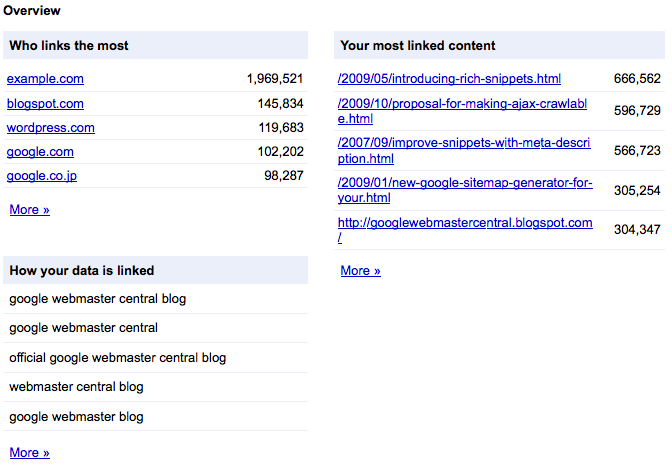
The "Links to your site" feature in Webmaster Tools is now updated to show you which domains link the most to your site, in addition to other improvements. On the overview page you'll notice that there are three main sections: the domains linking most to your site, the pages on your site with the most links, and a sampling of the anchor text external sites are using when they link to your site.Who links the mostClicking the “More >>” link under the “Who links the most” section will take you to a new view that shows a listing of all the domains that link to your site. Each domain in the list can be expanded to display a sample of pages from your site which are linked to by that domain.The "More >>" link under each specific domain lists all the pages linked to by that domain. At the top of the page there is a total count of links from that domain and a total count of your site's pages linked to from that domain.Your most linked content If you drill into the “Your most linked content” view from the overview page, you’ll see a listing of all your site’s most important linked pages. There's also a link count for each page as well as a count of domains linking to that page. Clicking any of the pages listed will expand the view to show you examples of the leading domains linking to that page and the number of links to the given page from each domain listed. The data used for link counts and throughout the "Links to your site" feature is more comprehensive now, including links redirected using 301 or 302 HTTP redirects.Each page listed in the "All linked pages" view has an associated "More >>" link which displays all the domains linking to that specific page on your site.Each domain listed leads to a report of all the pages from that domain linking to your specific page.We hope the updated “Links to your site” feature in Webmaster Tools will help you better understand where the links to your site are coming from and improve your ability to track changes to your site’s link profile.

Tuesday, October 12, 2010

Facebook Marketing

Why Facebook Marketing??

First and foremost, Facebook, like other social media, is a phenomenal way to become more visible and successful by making a face for yourself online.

Facebook is now the largest social network on the planet with over 500 million active users, long ago surpassing former social networking giant MySpace—and it continues to grow at 1 million new users a week.

Considering those numbers, you have to ask yourself—do you think your target market might be there? And if you’re not there, what might you be missing?

Facebook pages are great for a number of reasons:

Pages allow you to keep your personal info separate from your business info.
Pages are public, which means that they are visible to the search engines and are not behind a login like personal profiles are (so be sure to use keywords pertaining to your business in the title of your page if you can—Facebook is ranked very highly in the search engines and you can benefit from this!).
Pages are great for communicating with your supporters (formerly “fans”) and listening to, answering and updating them.
Pages help spread viral awareness of your brand and business—a key aspect is that when people who “like” your page interact with it, this activity shows up in the news feeds of all of their friends.
I Have a Page. Now What?

Ok, now that you know why they’re important, how do you use a page successfully?

Here are just a few ways:

Keep your page updated with content, such as pulling in your blog posts and sharing links.
Ask open-ended questions and engage your supporters whenever possible.
Treat your supporters to “exclusive” offers and content that not everyone else gets. Make them understand that they’re getting something special by supporting your business or brand on your page.
Add the Static FBML application to create a simple form on your page for people to sign up for your newsletter, free report or seminar.
Let your friends know about your page by clicking the link that says “Suggest to Friends” under your picture.